For restaurants, cafés and hotels

We provide smart restaurant service

Orders, kitchen and bills in one system.

Guests order from their phone. The kitchen hears it. The bill adds itself up.

  • No app for guests
  • Works on your Android phones
  • In English and नेपाली

Sound familiar?

  • The KOT slip fell behind the counter. Table 6 is still waiting.

  • Guests wave and wave, but every waiter is busy.

  • The second plate of momo never made it onto the bill.

  • Your regulars' credit lives in a notebook only one person can read.

  • At night the cash doesn't match the sales, and nobody knows why.

ServeFlow fixes each of these. Here's how one order travels.

How it works

How one order travels

Follow one order from Table 2, from the guest's phone to the paid bill. Every screen sees it at the same moment, and nobody carries a slip or types up a bill.

Keep scrolling to follow the order

“New order, table 2”

Hear it

“Food ready, table 2”

Hear it

Order AKS-118

Table 2
  • 2 × Buff Jhol MoMo
  • 1 × Chicken Fry Rice
TotalRs 420
Sent from Table 2New in the kitchenReady to serveFood readyServedPaid · Table 2 free
  1. The guest's phoneStep 1 of 6

    Scan and order.

    The guest scans the QR code on Table 2, adds two Buff Jhol MoMo and a Chicken Fry Rice, and taps Place order.

    • No app, no sign-up
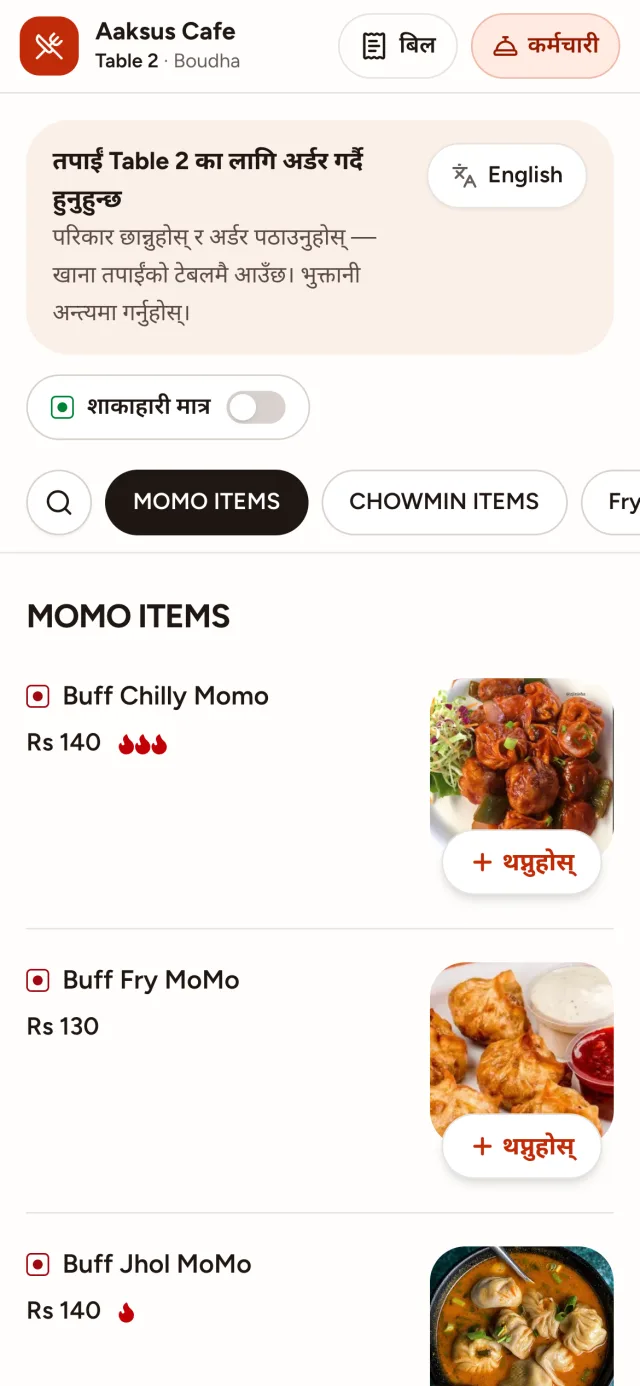
    • English or नेपाली

    Who does it

    The guest, from their own phone.

  2. The kitchen screenStep 2 of 6

    The kitchen hears it.

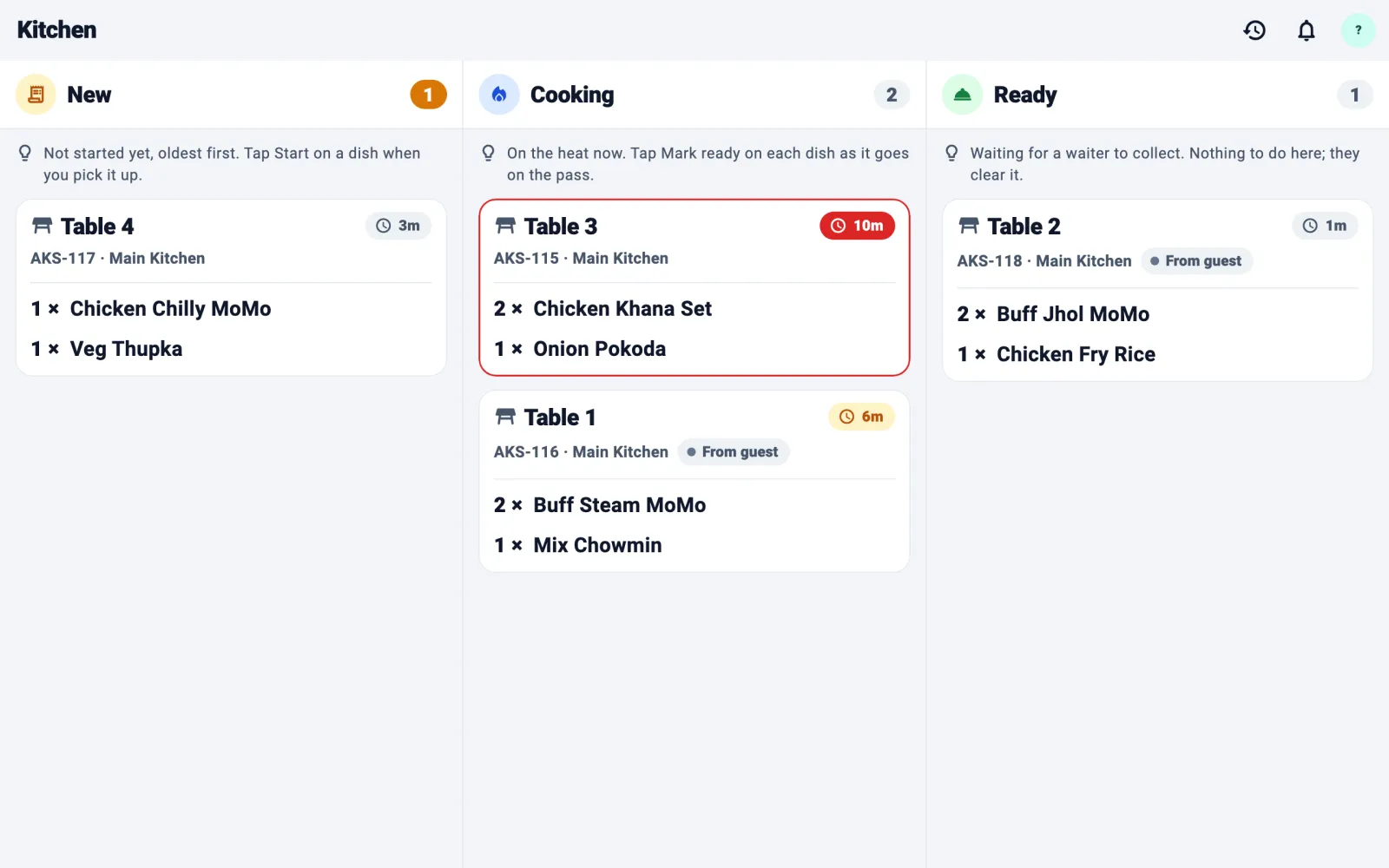
    The ticket is on the kitchen screen the moment it is placed, and the board reads it out loud.

    • Read out with the dish names
    • Even with the screen off

    Who does it

    Nobody. It happens by itself.

  3. The kitchen screenStep 3 of 6

    Cook, then tap Ready.

    A timer on every ticket keeps the oldest first. When the plates are up, one tap moves Table 2 to Ready.

    • A timer on every ticket
    • Drinks go to the bar

    Who does it

    The cook, with one tap.

  4. The waiter's phoneStep 4 of 6

    The waiter hears it.

    The waiter's phone says “Food ready, table 2” and shows exactly what to carry, even locked in a pocket.

    • Spoken in English or Nepali
    • Only to staff on shift

    Who does it

    Nobody. It happens by itself.

  5. The waiter's phoneStep 5 of 6

    Carry it over.

    The waiter takes the plates to Table 2 and taps Mark served. The guest's phone shows it served too.

    • Served dish by dish
    • The guest sees it live

    Who does it

    The waiter, with one tap.

  6. The waiter's phoneStep 6 of 6

    Paid, and the table is free.

    The bill already holds every order: Rs 420. Mark it paid by cash or QR, and Table 2 is ready for the next guests.

    • Cash or QR, recorded
    • No total typed by hand

    Who does it

    The waiter or the cashier.

One order. Three screens. No paper slips.

Request a free demo

Four apps. One system.

Everyone gets the screen made for their job. All four share the same live orders, so a change on one shows on all of them.

  • Guest menu

    For your guests

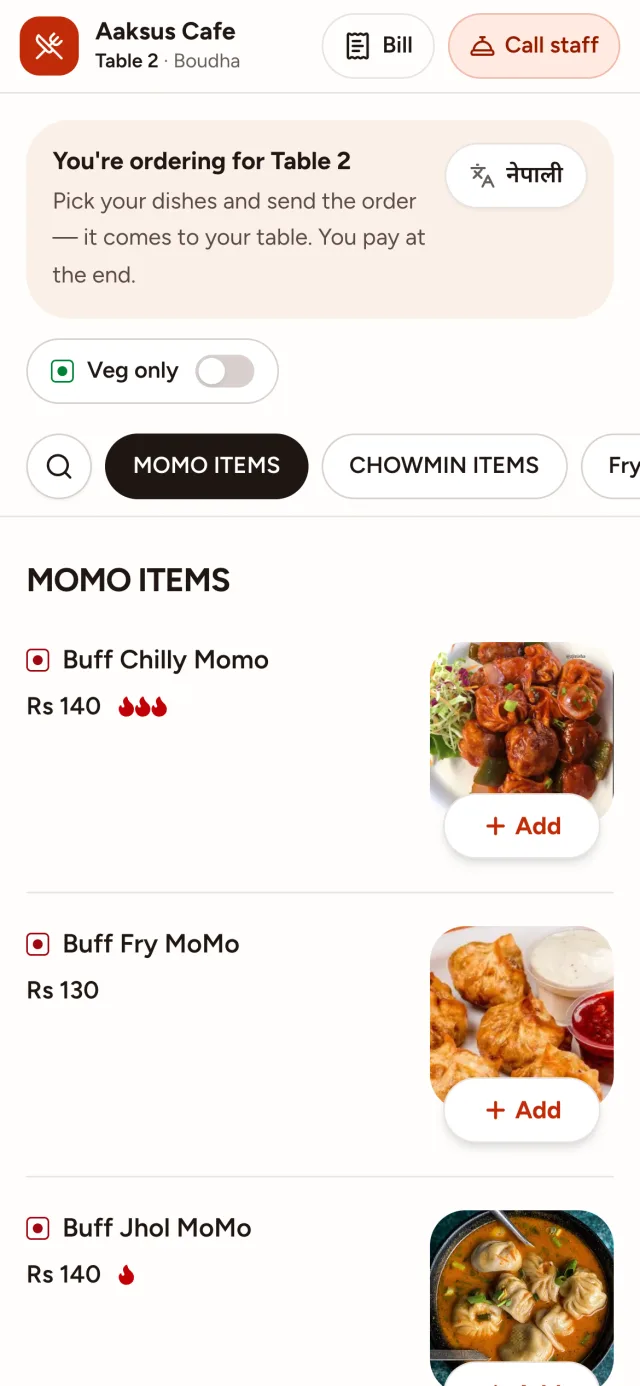
    Scan the table's QR code to see the menu, order, follow the order and ask for the bill. Nothing to install.

    Any phone with a camera

  • Staff app

    For waiters, cashiers and reception

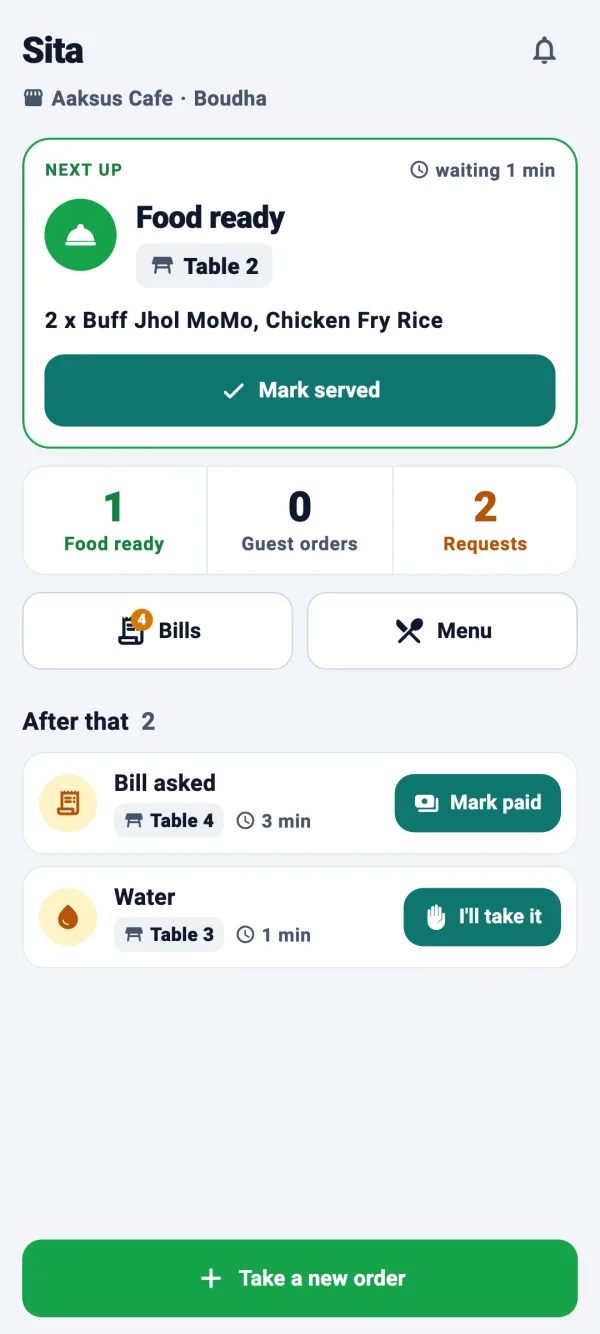
    Tables, orders, guest requests and bills, on a phone that speaks up when someone needs something.

    Android phone

  • Kitchen app

    For the kitchen and the bar

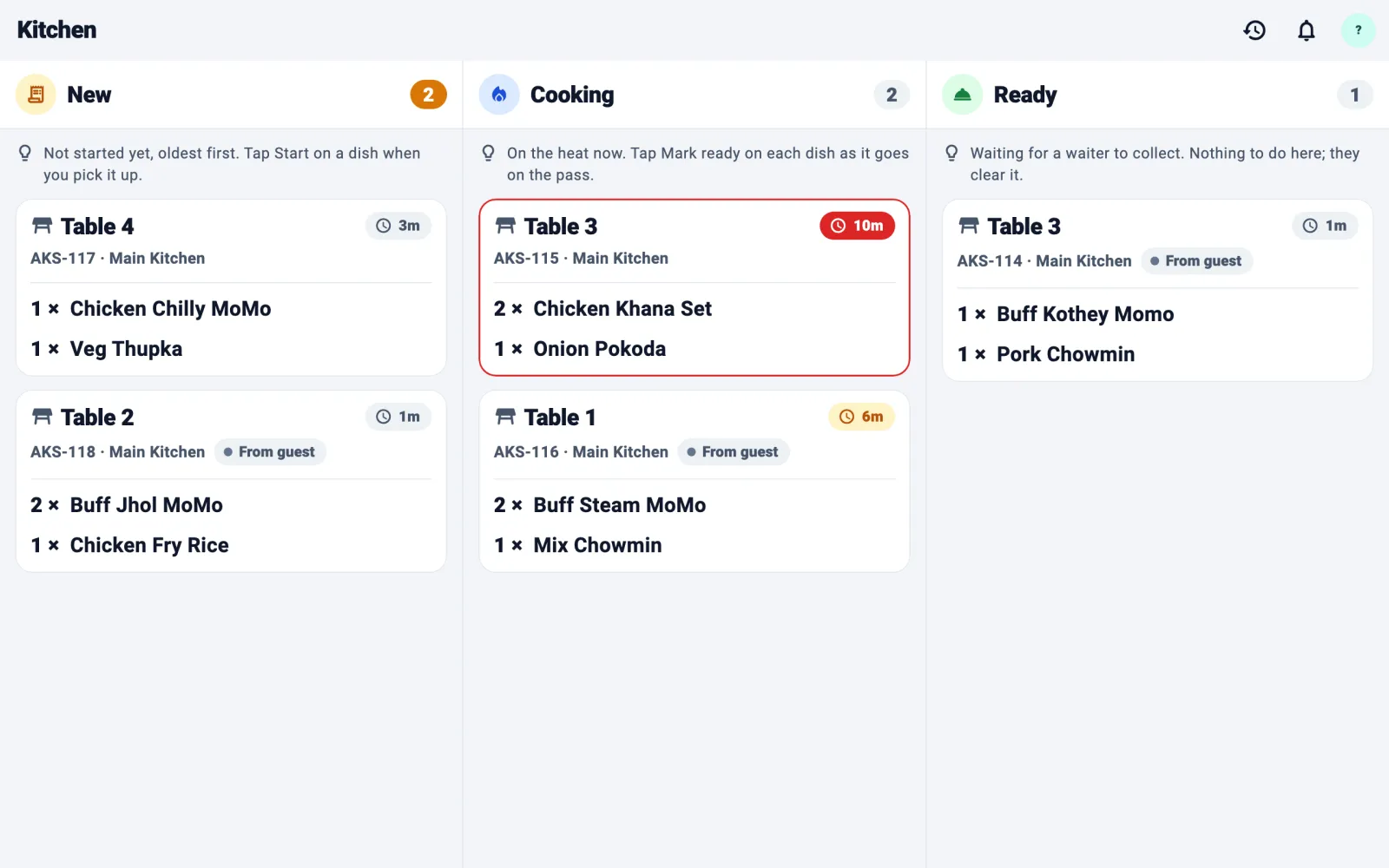
    Every order on one board, read out loud, with a timer on each ticket.

    Android phone or tablet

  • Business dashboard

    For you and your managers

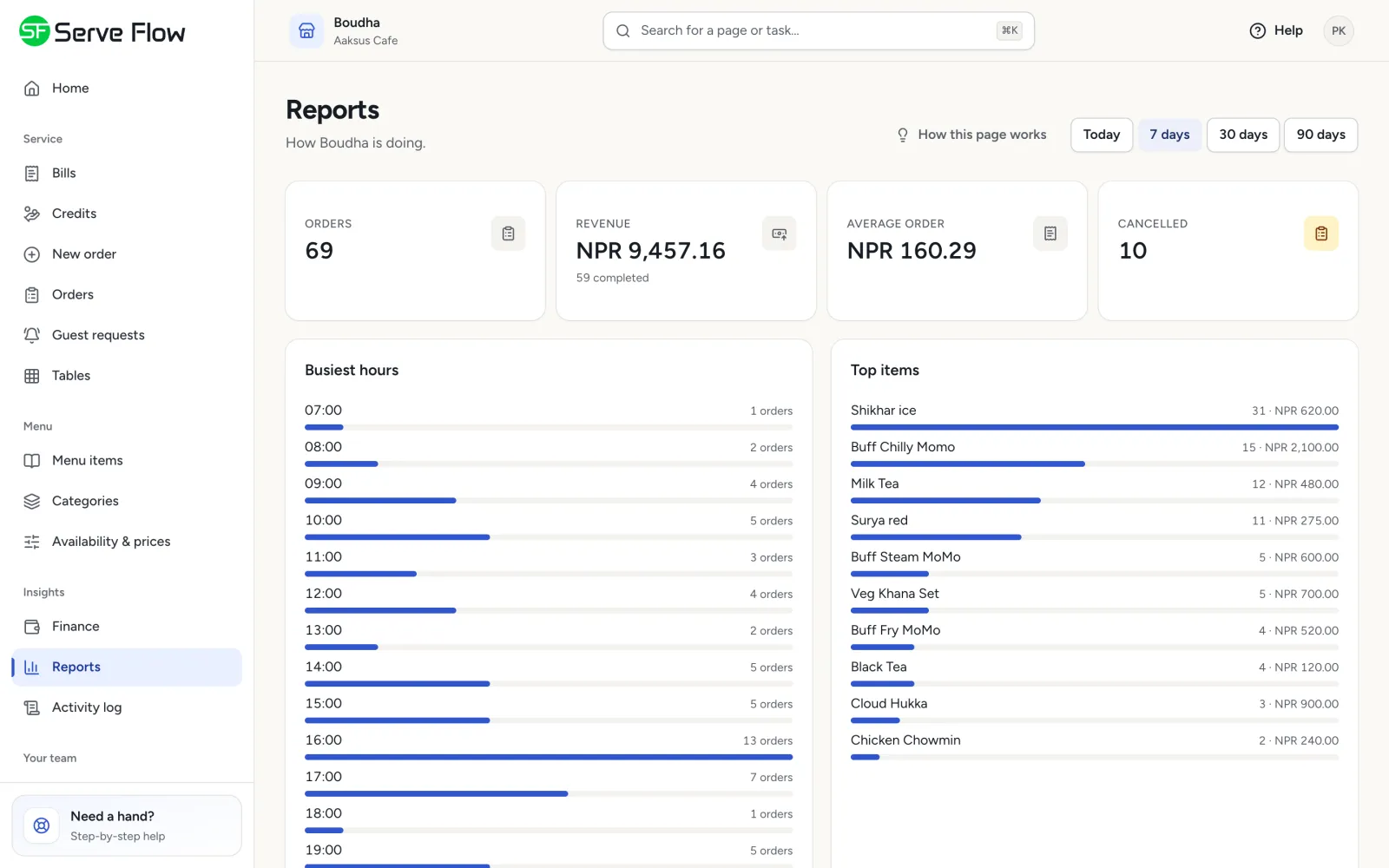
    Menu, tables, team, bills, credit and reports, with every branch in one place.

    Any browser

What makes ServeFlow different

The things owners end up telling each other about.

  • Guests need no app

    They scan, order and ask for the bill from their own phone. No download, no sign-up.

  • Phones that speak

    “Food ready, table 2.” Waiters and cooks hear it in English or Nepali, even with the screen locked.

  • Out of stock in one tap

    The cook taps Problem. The dish comes off the bill, the menu shows Sold out, and the waiter, the manager and the guest are all told.

  • Split the bill by phone

    Friends who ordered from their own phones each get their own total.

  • A credit book that keeps itself

    Put a regular's bill on credit (udharo), see who owes what, and settle it later.

  • One link for take-away

    Share it on Facebook, Instagram or Viber. Customers order for pickup or delivery, with a pin on the map.

Everything it does, for everyone who uses it

Pick a person to see their day with ServeFlow.

Your guests

Ordering without waiting for a waiter

Scan and order
Guests scan the QR code on the table and order from their own phone. No app, no sign-up.
A menu that sells
Photos, veg and non-veg marks, spice level, half and full plates, extras and search.
Live order status
Guests watch their order go from placed to cooking to ready to served.
No more waving
Call the waiter, ask for water or ask for the bill with one tap. Asking twice only calls once.

Also

  • The menu in English or नेपाली, with one tap
  • Change or cancel an order until the kitchen starts on it
  • Everyone at the table adds to one bill
  • A dish the kitchen couldn't make is crossed out and marked Not charged
  • Sold-out dishes show the moment the kitchen runs out
English
नेपाली
Your waiters

A phone that tells them what to do next

The phone speaks
“Food ready, table 2, chicken momo.” It works with the phone locked in a pocket.
Every table at a glance
Which tables are busy, which want the bill, and which need something.
Guest requests in one list
Water, waiter, bill, room service. Accept it and the guest sees someone is coming.
Take payment on the floor
Mark a bill paid, by cash or QR, right at the table.

Also

  • Take orders at the table. They go to the same kitchen and the same bill
  • Serve dish by dish as each one is ready
  • Slide to start a shift. Alerts come only while someone is on shift
  • Shared phones are fine. Alerts go to whoever is signed in
  • Told out loud when a guest changes an order or a dish is cancelled, with the reason

Hear what your team hears

These are the real voices from the Staff and Kitchen apps.

Your kitchen

No more paper slips

Orders arrive instantly
Every order appears on the kitchen screen the moment it's placed.
Hears new orders
The board reads out new tickets with the dish names, even with the screen off.
Ran out? One tap
Problem takes the dish off, corrects the bill, shows Sold out on the menu and tells the waiter, the manager and the guest.
Start and Ready
Tap when cooking starts and when it's done. The waiter hears Ready at once.

Also

  • Each counter gets its own dishes: drinks to the bar, food to the kitchen
  • A timer on every ticket, so nothing is forgotten
  • A history of finished tickets
You and your managers

The whole business on one screen

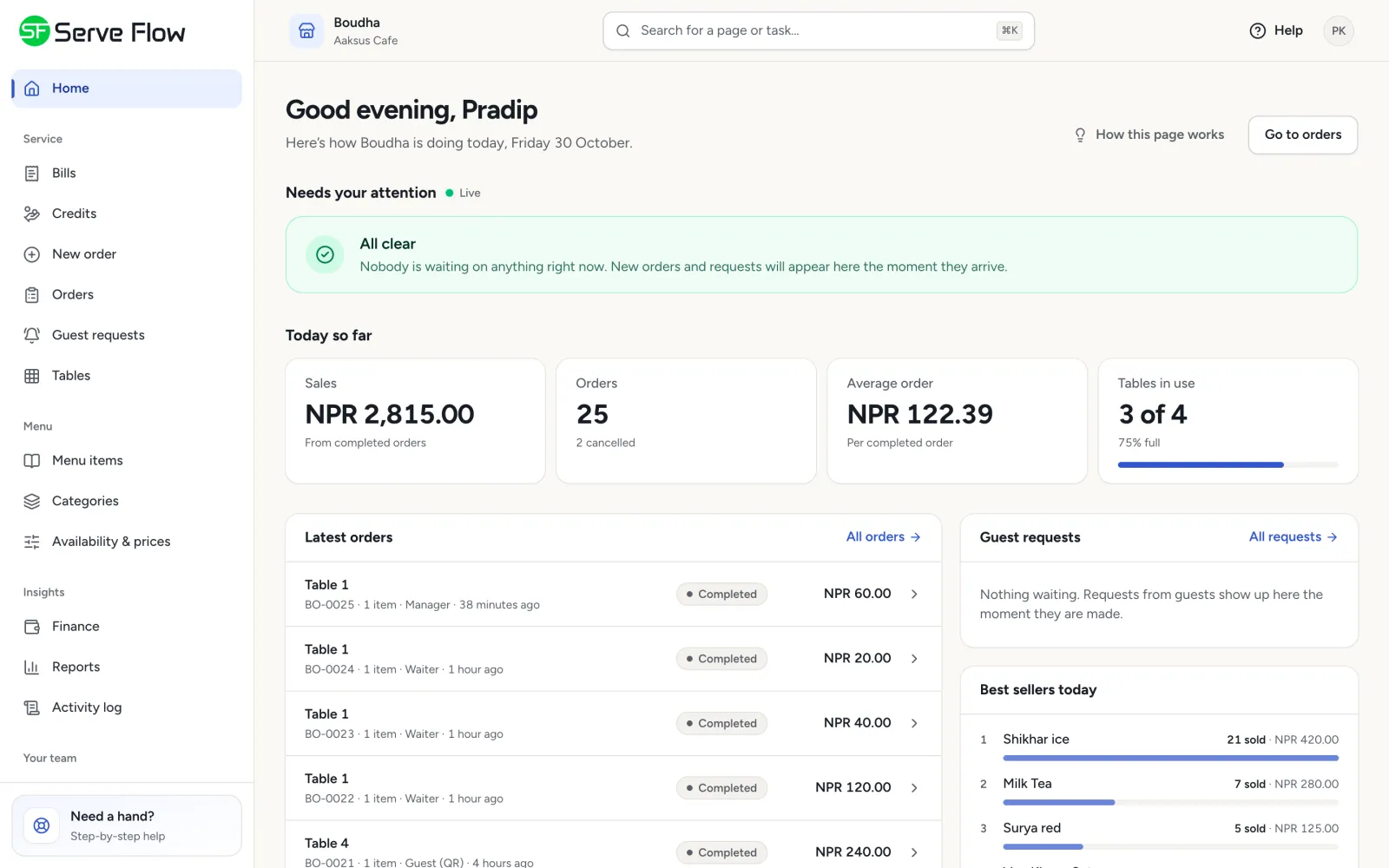
Today at a glance
Sales, orders and anything waiting, as the day happens.
Reports
Best-selling dishes, busiest hours, busiest tables, orders per staff member, and how fast guests were answered.
Time log
Who started and ended their shift and when, and the hours each person worked.
A menu in minutes
Paste a photo, add sizes and extras, and switch a dish off when it's finished.

Also

  • Every order live, from every source. Accept it, or refuse it with a reason
  • Ready-made QR cards to print for every table and room
  • Replace a lost or copied QR code in one click
  • Accept orders automatically, or have staff accept each one
  • A table can only order once a waiter opens it, which stops prank orders
  • Many branches, one login. Managers see only their own
  • See which app handled each order, so you know your team really uses it
  • Invite staff by email. Nobody can join uninvited
  • Roles for manager, waiter, chef, cashier, reception and housekeeping, or make your own
  • An audit log of every change that nobody can edit

Built for hotels too

Put a QR code in every room. Guests choose Room Service (housekeeping, towels, water) or order food to the room. Rooms and the restaurant run in one system, with roles for reception and housekeeping.

Take-away and delivery from one link

One link per branch for Facebook, Instagram, flyers or Viber, and it never changes. Customers order for pickup or delivery with a pin on the map, and their details are remembered for next time. Too busy? Pause the link.

Know where every rupee went

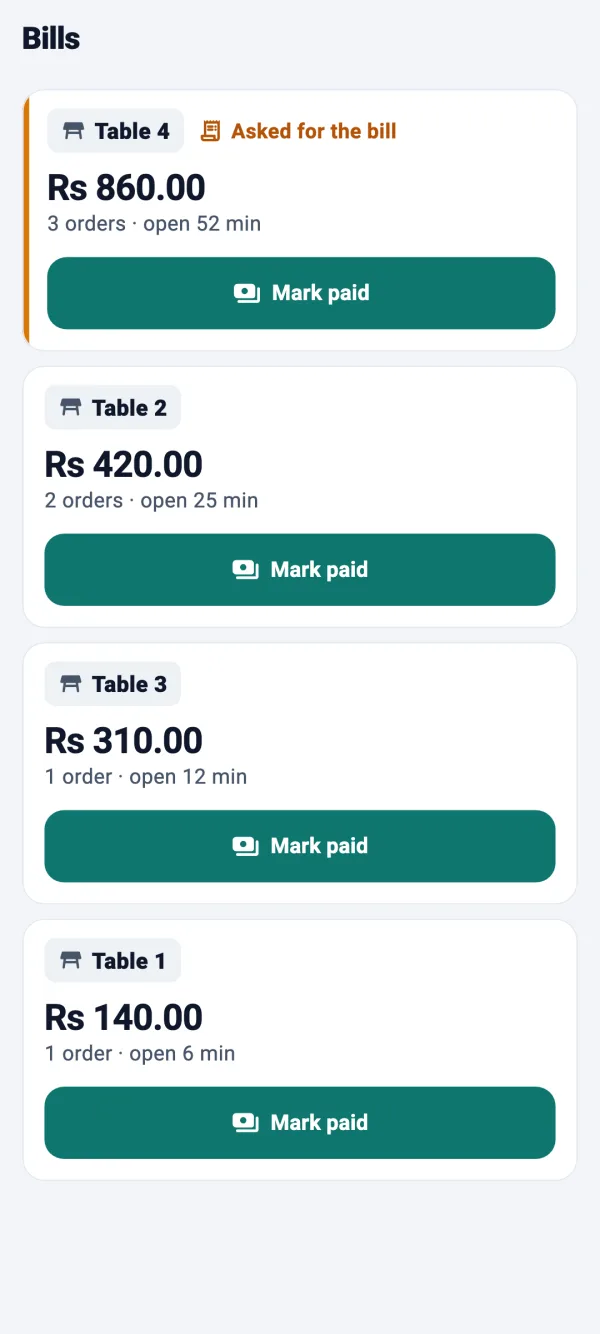
Bills add themselves up from the orders. Nobody types a total, and nothing gets left off.

  • A bills screen made for the counter

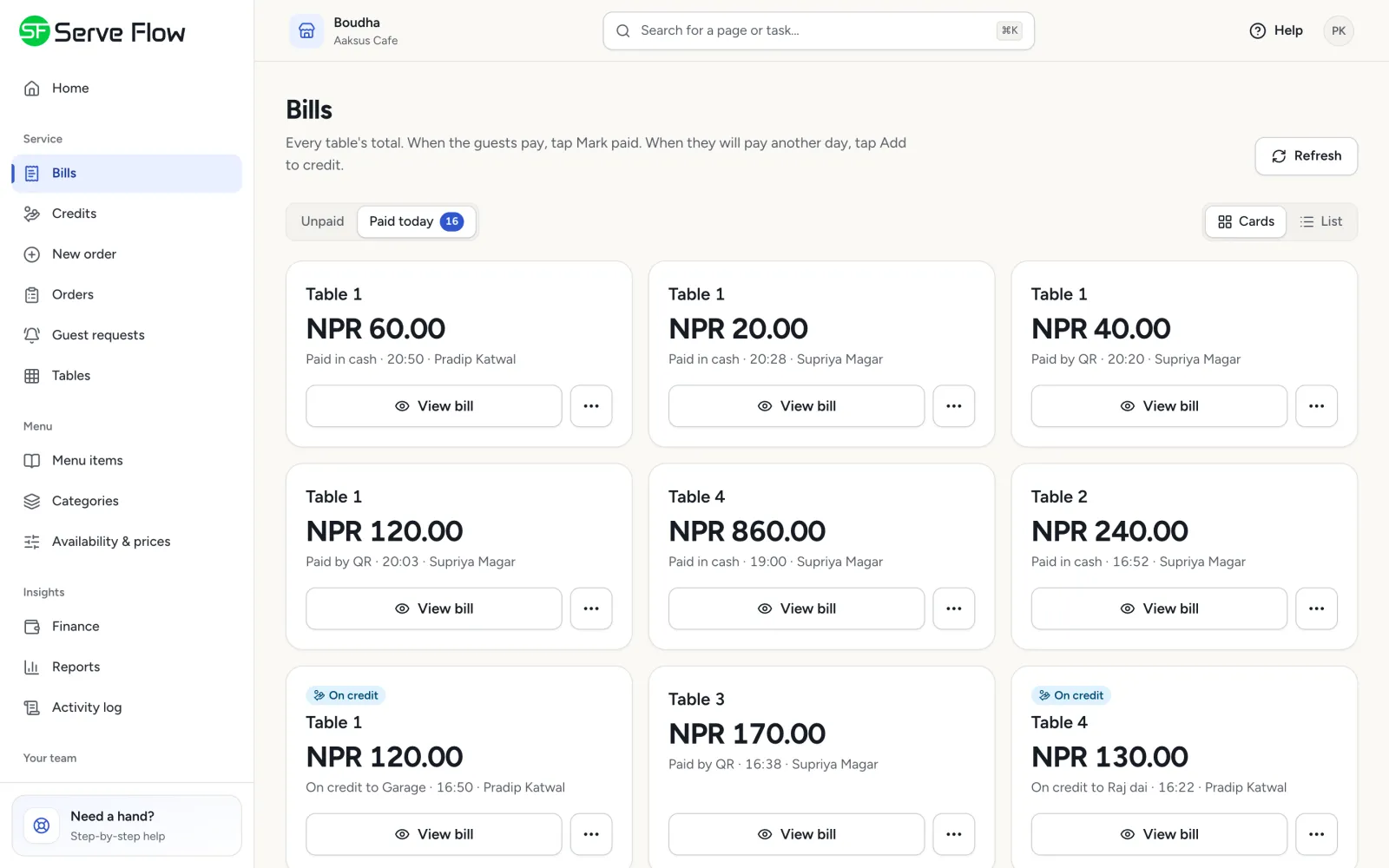
    Unpaid and paid today. One big card per table, tables asking for the bill first, and totals that update live.

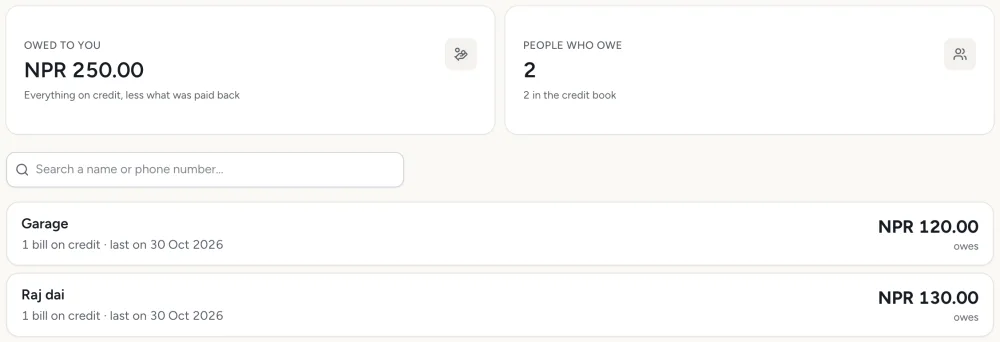
  • Combine and split

    Put tables 4 and 5 on one bill, or give each phone its own total.

  • Cash or QR

    Record how every bill was paid.

  • Credit book (udharo)

    Put a regular's bill on credit, see who owes what, and settle it later.

  • Day book and statement

    Every rupee that came in, by cash, QR and credit paid back, for any dates.

  • Service charge and tax

    Set them once. They apply to every bill.

What you need

No special hardware and no installation visit.

  • Guests

    Their own phone with a camera

  • Waiters and cashiers

    An Android phone

  • Kitchen and bar

    An Android phone or tablet

  • You

    Any browser, on a laptop, tablet or phone

And an internet connection: Wi-Fi or mobile data. Weak signal? A tap never places the same order twice.

Up and running in four steps

  1. 1

    We set up your business

    Tell us your branches, tables and rooms on the demo call, and we create your account.

  2. 2

    Add your menu

    Dishes, prices and photos. Paste a photo straight in.

  3. 3

    Print your QR codes

    Ready-made cards for every table and room, from the dashboard.

  4. 4

    Invite your team

    Each person gets an email with a code, installs the app and joins.

Questions owners ask

Do guests need to download an app?

No. They scan the QR code with their phone's camera and the menu opens in the browser.

Can I use it without guests ordering from their phones?

Yes. Switch guest ordering off and your waiters take every order in the Staff app. The kitchen, bills and reports work the same.

What happens if the internet drops?

ServeFlow needs a connection. If a tap can't get through, the app says so and lets you send it again, and the same order is never placed twice.

Do the staff apps work on iPhone?

The Staff and Kitchen apps are made for Android phones and tablets. Guests can use any phone, and the dashboard works in any browser.

Does ServeFlow take payments?

No. Guests pay you the way they do today, in cash or by QR. ServeFlow records how each bill was paid.

Can it speak Nepali?

Yes. The guest menu and the phones' spoken alerts work in both English and Nepali. The staff screens and the dashboard are in English.

Can I run more than one branch?

Yes. One login sees every branch, and each manager sees only their own.

Is my data safe?

Each business is sealed off from every other. Only people you invite can sign in, and every change is recorded in an audit log nobody can edit.

How much does it cost?

It depends on how many branches, tables and staff you have. Request a demo and we'll give you a price for your business.

Request a demo

Tell us a little about your business. We'll call you back to find a time, then walk you through every screen and answer your questions.

What happens next

  1. 1

    We call you back

    To find a time that suits you.

  2. 2

    A free demo

    Every screen, for guests, waiters, the kitchen and you.

  3. 3

    We set you up

    If you like it, we create your account and help you add your menu.

Type of business (optional)

We use these details only to contact you about ServeFlow. Privacy