Waiter calling system for restaurants in Nepal
A waiter calling system with no buttons or pagers to buy
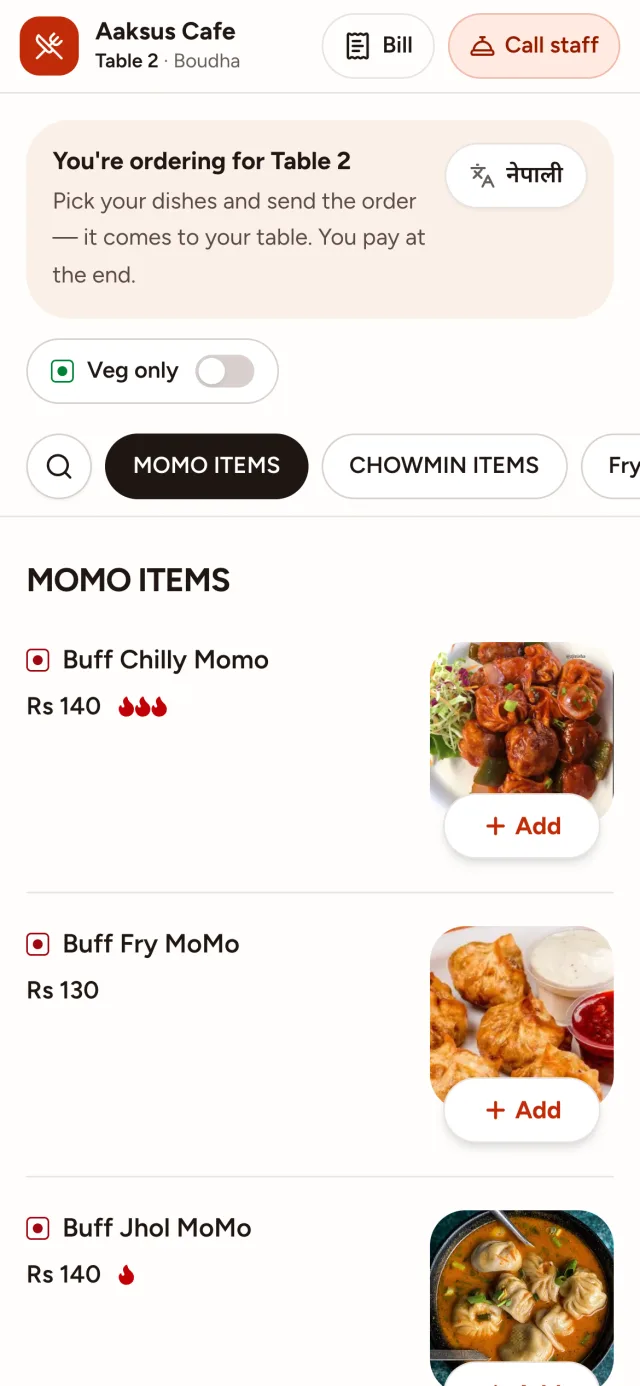
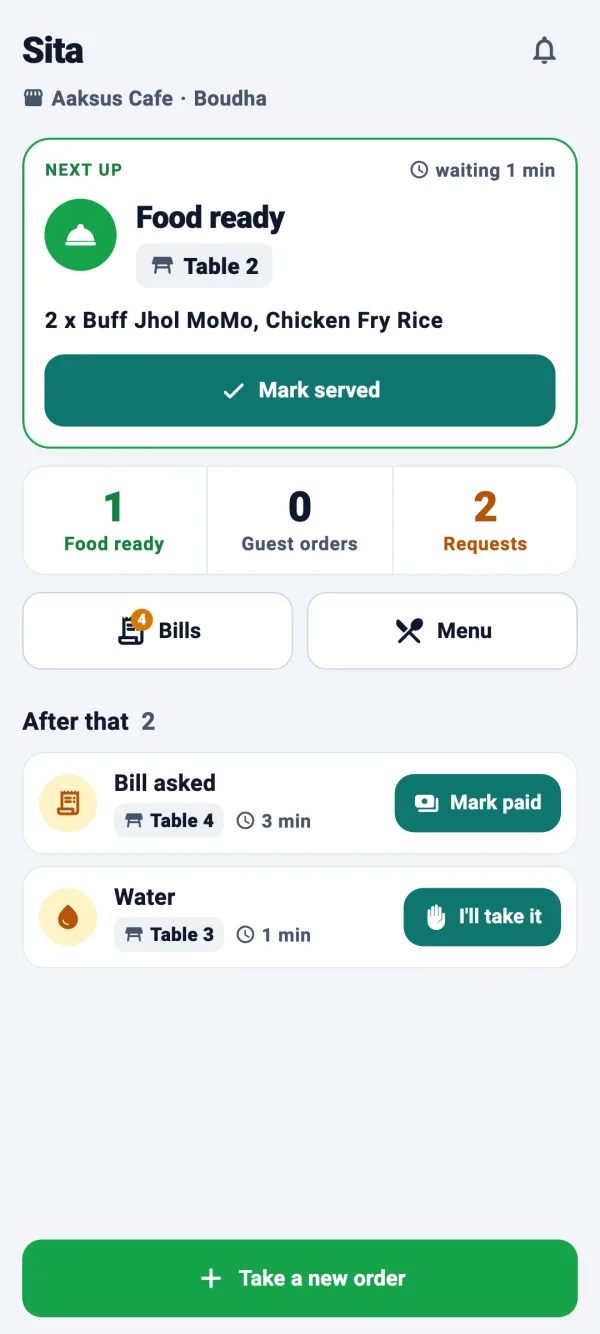
Guests call the waiter, ask for water or ask for the bill from the menu they opened with the table's QR code. The request goes to the right person, and their phone says it out loud: “Water, table 5.”
- The guest's own phone is the call button
- The waiter's phone is the pager, and it speaks
- Guests see when someone is on the way
What is a waiter calling system?
A waiter calling system lets guests ask for service without waving or shouting across the room. The usual kind is hardware: a call button or calling bell on every table, and a pager or wristwatch for each waiter that buzzes with the table number.
ServeFlow does the same job with the phones already in the room. The guest taps Call Waiter, Water or another request on the menu they opened from the table's QR code, and it reaches the Staff app of whoever handles that request. There is nothing to stick to the tables and no batteries to change.
And it says what the guest wants, not just which table pressed: water, tissues, a clean table or the bill. The waiter comes back with it the first time.
How a call reaches your team
- 1
The guest asks
From the menu on their phone, the guest taps Call Waiter, Water, Tissue, Cutlery, Extra Plate or Clean Table, and can add a note such as “two glasses”.
- 2
The right phone speaks
Table requests go to the waiters and the bill to the cashier, read out loud: “Water, table 5.” Only staff on shift are alerted.
- 3
Taken, then done
Staff tap to take the request and mark it done. The guest's phone shows Seen by staff, then On the way, then Done.
- 4
Asked twice, called once
If anyone at the table asks for the same thing again, it joins the request that's already open instead of ringing again.
Better than a bell on the table
It tells your team what's needed, tells the guest it's coming, and keeps count.
- Guest menu
Says what's needed
Water, tissues, cutlery, an extra plate, a clean table or the waiter: each request names it, so it's brought the first time.
- Staff app
Spoken, even in a pocket
“Waiter needed, table 4.” The Staff app reads each request out in English or Nepali, even with the screen locked.
- Staff app
To the right person
Each kind of request goes to the role that handles it: the bill to the cashier, and towels to housekeeping in hotel rooms.
- Guest menu
Guests know they've been heard
Sent, Seen by staff, On the way, Done. The guest can see it's coming, so the waving stops.
- Business dashboard
Nobody left waiting for the bill
The dashboard warns you when guests are asking for the bill and nobody has answered yet.
- Business dashboard
How fast your team answers
Reports count the requests raised and completed, and the average time it took to close one.
Table buttons or ServeFlow
| Where they differ | Call buttons and pagers | ServeFlow |
|---|---|---|
| What you buy | Call buttons and pagersA button for every table and a pager or watch for each waiter | ServeFlowNo extra hardware: guests' own phones and your staff's Android phones |
| What the waiter learns | Call buttons and pagersWhich table pressed | ServeFlowWhich table, and what they need |
| What the guest knows | Call buttons and pagersNothing, until someone comes | ServeFlowSeen by staff, then On the way |
| Asking twice | Call buttons and pagersCalls twice | ServeFlowJoins the request that's already open |
| Upkeep | Call buttons and pagersBatteries to change, buttons that go missing | ServeFlowNothing on the table but a printed QR card |
| Records | Call buttons and pagersNone | ServeFlowEvery request, and the average time to close one |
What you need
No special hardware and no installation visit.
Guests
Their own phone with a camera
Waiters and cashiers
An Android phone
Kitchen and bar
An Android phone or tablet
You
Any browser, on a laptop, tablet or phone
And an internet connection: Wi-Fi or mobile data. Weak signal? A tap never places the same order twice.
Up and running in four steps
- 1
We set up your business
Tell us your branches, tables and rooms on the demo call, and we create your account.
- 2
Add your menu
Dishes, prices and photos. Paste a photo straight in.
- 3
Print your QR codes
Ready-made cards for every table and room, from the dashboard.
- 4
Invite your team
Each person gets an email with a code, installs the app and joins.
Questions owners ask
Do I need to buy call buttons or pagers?
No. Guests use the menu on their own phone, and your staff get each request in the Staff app on their Android phones.
What can guests ask for?
Call Waiter, Water, Tissue, Cutlery, Extra Plate and Clean Table, plus the bill from the bill screen. In hotel rooms, guests can also ask for Housekeeping, Towels and Maintenance.
What if a guest has no smartphone?
They call a waiter the usual way. Asking from the phone is an extra way in, not the only one.
Do waiters get calls when they're off duty?
No. Staff slide to start a shift, and alerts go only to staff who are on shift.
Can I switch phone requests off?
Yes. Turn guest requests off in the dashboard's settings, and guests are asked to call a staff member instead.
How much does a waiter calling system cost?
The price depends on how many branches, tables and staff you have. Request a demo and we'll give you a price.
See it for your business
ServeFlow is one system for the whole business. Read on for yours.
- RestaurantsQR ordering, a kitchen order screen and billing for dine-in.
- CafésA QR menu, orders heard at the counter and bills that split by phone.
- HotelsRoom service, housekeeping requests and the hotel restaurant in one system.
- Bars & pubsDrinks to the bar's own screen, and every round on the table's bill.
- Resorts & homestaysFood and room service from a QR code in every room, cottage or garden table.
- KOT systemKitchen order tickets on a screen that reads every order out loud.
- QR menuA menu guests open from the QR code on the table, and order from.
Request a demo
Tell us a little about your business. We'll call you back to find a time, then walk you through every screen and answer your questions.
What happens next
- 1
We call you back
To find a time that suits you.
- 2
A free demo
Every screen, for guests, waiters, the kitchen and you.
- 3
We set you up
If you like it, we create your account and help you add your menu.